Monday, June 8, 2020

Why (I Believe) WADA Was Not Hacked By The Russians

Disclaimer: This is my personal opinion. I am not an expert in attribution. But as it turns out, not many people in the world are good at attribution. I know this post lacks real evidence and is mostly based on speculation.


Let's start with the main facts we know about the WADA hack, in chronological order:


1. Some point in time (August - September 2016), the WADA database has been hacked and exfiltrated
2. August 15th, "WADA has alerted their stakeholders that email phishing scams are being reported in connection with WADA and therefore asks its recipients to be careful"  https://m.paralympic.org/news/wada-warns-stakeholders-phishing-scams
3. September 1st, the fancybear.net domain has been registered
   Domain Name: FANCYBEAR.NET
...
Updated Date: 18-sep-2016
Creation Date: 01-sep-2016
4. The content of the WADA hack has been published on the website
5. The @FancyBears and @FancyBearsHT Twitter accounts have been created and started to tweet on 12th September, reaching out to journalists
6. 12th September, Western media started headlines "Russia hacked WADA"
7. The leaked documents have been altered, states WADA https://www.wada-ama.org/en/media/news/2016-10/cyber-security-update-wadas-incident-response


The Threatconnect analysis

The only technical analysis on why Russia was behind the hack, can be read here: https://www.threatconnect.com/blog/fancy-bear-anti-doping-agency-phishing/

After reading this, I was able to collect the following main points:

  1. It is Russia because Russian APT groups are capable of phishing
  2. It is Russia because the phishing site "wada-awa[.]org was registered and uses a name server from ITitch[.]com, a domain registrar that FANCY BEAR actors recently used"
  3. It is Russia because "Wada-arna[.]org and tas-cass[.]org were registered through and use name servers from Domains4bitcoins[.]com, a registrar that has also been associated with FANCY BEAR activity."
  4. It is Russia, because "The registration of these domains on August 3rd and 8th, 2016 are consistent with the timeline in which the WADA recommended banning all Russian athletes from the Olympic and Paralympic games."
  5. It is Russia, because "The use of 1&1 mail.com webmail addresses to register domains matches a TTP we previously identified for FANCY BEAR actors."

There is an interesting side-track in the article, the case of the @anpoland account. Let me deal with this at the end of this post.

My problem with the above points is that all five flag was publicly accessible to anyone as TTP's for Fancy Bear. And meanwhile, all five is weak evidence. Any script kittie in the world is capable of both hacking WADA and planting these false-flags.

A stronger than these weak pieces of evidence would be:

  • Malware sharing same code attributed to Fancy Bear (where the code is not publicly available or circulating on hackforums)
  • Private servers sharing the IP address with previous attacks attributed to Fancy Bear (where the server is not a hacked server or a proxy used by multiple parties)
  • E-mail addresses used to register the domain attributed to Fancy Bear
  • Many other things
For me, it is quite strange that after such great analysis on Guccifer 2.0, the Threatconnect guys came up with this low-value post. 


The fancybear website

It is quite unfortunate that the analysis was not updated after the documents have been leaked. But let's just have a look at the fancybear . net website, shall we?

Now the question is, if you are a Russian state-sponsored hacker group, and you are already accused of the hack itself, do you create a website with tons of bears on the website, and do you choose the same name (Fancy Bear) for your "Hack team" that is already used by Crowdstrike to refer to a Russian state-sponsored hacker group? Well, for me, it makes no sense. Now I can hear people screaming: "The Russians changed tactics to confuse us". Again, it makes no sense to change tactics on this, while keeping tactics on the "evidence" found by Threatconnect.

It makes sense that a Russian state-sponsored group creates a fake persona, names it Guccifer 2.0, pretends Guccifer 2.0 is from Romania, but in the end it turns out Guccifer 2.0 isn't a native Romanian speaker. That really makes sense.

What happens when someone creates this fancybear website for leaking the docs, and from the Twitter account reaches out to the media? Journalists check the website, they see it was done by Fancy Bear, they Bing Google this name, and clearly see it is a Russian state-sponsored hacker group. Some journalists also found the Threatconnect report, which seems very convincing for the first read. I mean, it is a work of experts, right? So you can write in the headlines that the hack was done by the Russians.

Just imagine an expert in the USA or Canada writing in report for WADA:
"the hack was done by non-Russian, but state-sponsored actors, who planted a lot of false-flags to accuse the Russians and to destroy confidence in past and future leaks". Well, I am sure this is not a popular opinion, and whoever tries this, risks his career. Experts are human, subject to all kinds of bias.

The Guardian

The only other source I was able to find is from The Guardian, where not just one side (it was Russia) was represented in the article. It is quite unfortunate that both experts are from Russia - so people from USA will call them being not objective on the matter. But the fact that they are Russian experts does not mean they are not true ...

https://www.theguardian.com/sport/2016/sep/15/fancy-bears-hackers--russia-wada-tues-leaks

Sergei Nikitin:
"We don't have this in the case of the DNC and Wada hacks, so it's not clear on what basis conclusions are being drawn that Russian hackers or special services were involved. It's done on the basis of the website design, which is absurd," he said, referring to the depiction of symbolically Russian animals, brown and white bears, on the "Fancy Bears' Hack Team" website.

I don't agree with the DNC part, but this is not the topic of conversation here.

Alexander Baranov:
"the hackers were most likely amateurs who published a "semi-finished product" rather than truly compromising information. "They could have done this more harshly and suddenly," he said. "If it was [state-sponsored] hackers, they would have dug deeper. Since it's enthusiasts, amateurs, they got what they got and went public with it.""

The @anpoland side-track

First please check the tas-cas.org hack https://www.youtube.com/watch?v=day5Aq0bHsA  , I will be here when you finished it. This is a website for "Court of Arbitration for Sport's", and referring to the Threatconnect post, "CAS is the highest international tribunal that was established to settle disputes related to sport through arbitration. Starting in 2016, an anti-doping division of CAS began judging doping cases at the Olympic Games, replacing the IOC disciplinary commission." Now you can see why this attack is also discussed here.


  • My bet is that this machine was set-up for these @anpoland videos only. Whether google.ru is a false flag or it is real, hard to decide. It is interesting to see that there is no google search done via google.ru, it is used only once. 
  • The creator of the video can't double click. Is it because he has a malfunctioning mouse? Is it because he uses a virtualization console, which is near-perfect OPSEC to hide your real identity? My personal experience is that using virtualization consoles remotely (e.g. RDP) has very similar effects to what we can see on the video. 
  • The timeline of the Twitter account is quite strange, registered in 2010
  • I agree with the Threatconnect analysis that this @anpoland account is probably a faketivist, and not an activist. But who is behind it, remains a mystery. 
  • Either the "activist" is using a whonix-like setup for remaining anonymous, or a TOR router (something like this), or does not care about privacy at all. Looking at the response times (SQLmap, web browser), I doubt this "activist" is behind anything related to TOR. Which makes no sense for an activist, who publishes his hack on Youtube. People are stupid for sure, but this does not add up. It makes sense that this was a server (paid by bitcoins or stolen credit cards or whatever) rather than a home computer.
For me, this whole @anpoland thing makes no sense, and I think it is just loosely connected to the WADA hack. 

The mysterious Korean characters in the HTML source

There is another interesting flag in the whole story, which actually makes no sense. When the website was published, there were Korean characters in HTML comments. 


When someone pointed this out on Twitter, these Korean HTML comments disappeared:
These HTML comments look like generated HTML comments, from a WYSIWYG editor, which is using the Korean language. Let me know if you can identify the editor.

The Russians are denying it

Well, what choice they have? It does not matter if they did this or not, they will deny it. And they can't deny this differently. Just imagine a spokesperson: "Previously we have falsely denied the DCC and DNC hacks, but this time please believe us, this wasn't Russia." Sounds plausible ...

Attribution

Let me sum up what we know:

It makes sense that the WADA hack was done by Russia, because:

  1. Russia being almost banned from the Olympics due to doping scandal, it made sense to discredit WADA and US Olympians
  2. There are multiple(weak) pieces of evidence which point to Russia
It makes sense that the WADA hack was not done by  Russia, because: 
  1. By instantly attributing the hack to the Russians, the story was more about to discredit Russia than discrediting WADA or US Olympians.
  2. In reality, there was no gain for Russia for disclosing the documents. Nothing happened, nothing changed, no discredit for WADA. Not a single case turned out to be illegal or unethical.
  3. Altering the leaked documents makes no sense if it was Russia (see update at the end). Altering the leaked documents makes a lot of sense if it was not Russia. Because from now on, people can always state "these leaks cannot be trusted, so it is not true what is written there". It is quite cozy for any US organization, who has been hacked or will be hacked. If you are interested in the "Russians forging leaked documents" debate, I highly recommend to start with this The Intercept article
  4. If the Korean characters were false flags planted by the Russians, why would they remove it? If it had been Russian characters, I would understand removing it.
  5. All evidence against Russia is weak, can be easily forged by even any script kittie.

I don't like guessing, but here is my guess. This WADA hack was an operation of a (non-professional) hackers-for-hire service, paid by an enemy of Russia. The goal was to hack WADA, leak the documents, modify some contents in the documents, and blame it all on the Russians ...

Questions and answers

  • Was Russia capable of doing this WADA hack? Yes.
  • Was Russia hacking WADA? Maybe yes, maybe not.
  • Was this leak done by a Russian state-sponsored hacker group? I highly doubt that.
  • Is it possible to buy an attribution-dice where all six-side is Russia? No, it is sold-out. 

To quote Patrick Gray: "Russia is the new China, and the Russians ate my homework."©

Let me know what you think about this, and please comment. 

More information


  1. Hacker Forum
  2. Pentest News
  3. Pentest Wiki
  4. Pentest Magazine
  5. Pentester Academy
  6. Hacker Attack
  7. How To Pentest A Website With Kali
  8. Hacking Lab
  9. Hacking Forums
  10. Pentest With Kali
  11. Hacking Gif
  12. Hacker Tools

Tishna: An Automated Pentest Framework For Web Servers, Web Applications To Web Security

About Tishna:
   Tishna is complete automated pentest framework for web servers, application layer to web security.

   Tishna was tested on: Kali Linux, Parrot Security OS, Black Arch, Termux, Android Led TV.


Tishna's interface: Tishna has 62 options with full automation and can be use for web security swiss knife.

Tishna's installation: First, boot your Kali Linux or Parrot Security OS up. Then open Terminal and enter these commands

Appeared:
  • Cyber Space (Computer Security).
  • Terror Security (Computer Security).
  • National Cyber Security Services.

Brief Introduction
  • Tishna is useful in Banks, Private Organisations and Ethical hacker personnel for legal auditing.
  • It serves as a defense method to find as much as information possible for gaining unauthorised access and intrusion.
  • With the emergence of more advanced technology, cybercriminals have also found more ways to get into the system of many organizations.
  • Tishna software can audit, servers and web behaviour.
  • Tishna can perform Scanning & Enumeration as much as possible of target.
  • It's first step to stop cyber criminals by securing your Servers and Web Application Security.
  • Tishna is false positive free, when there is something it will show no matter what, if it is not, it will give blank results rather error.

Developer

Support to the coder
   You can sponsor and support via BTC.
   The bitcoin address: 3BuUYgEgsRuEra4GwqNVLKnDCTjLEDfptu
qr code

Read more

Sunday, June 7, 2020

What Is Brave Browser And How Does It Compares To Chrome ?

       There are more competing web browsers than ever, with many serving different niches. One example is Brave, which has an unapologetic focus on user privacy and comes with a radical reimagining of how online advertising ought to work.

Brave is based on Chromium, the open-source code that forms the basis for Google Chrome. But is it any good? And for those using Google Chrome, is it worth switching to Brave?

A Brief History of Brave

When Brendan Eich and Brian Bondy founded Brave in 2015, they wanted to address what they perceived as the biggest problem with the modern internet: intrusive advertising.

Advertising is the fuel that powers the modern internet, allowing websites and digital creatives to monetize their content without charging users for each article read or every video watched. That said, Eich and Bondy think it's got some pretty significant downsides, citing the potentially privacy-harming nature of advertising trackers, as well as the negative impact it has on the overall user experience.

Brave's first release came about amidst two significant trends, which ultimately defined the new browser.

First, the cryptocurrency revolution was in full swing. Companies and individuals alike—like the pseudonymous Satoshi Nakamoto—were creating their own decentralized cryptocurrencies, which quickly reached billion-dollar market capitalizations. Second, ad-blocking technology entered the mainstream. By the decade's halfway point, millions of people were blocking ads online across all browsers, desktop, and mobile.

Brave was one of the first browsers to include built advertisement and tracker blockers, leapfrogging the likes of Opera. It also came with its own cryptocurrency, called BAT (or Basic Attention Token), allowing users to reimburse the sites and creators they like.

Essentially, Brave wants to re-imagine how the Internet works: not just on a usability level, but on an economic level. It's an undeniably radical vision, but you wouldn't expect any less, given its founding team.

Brendan Eich is the inventor of the JavaScript programming language and co-founded the Mozilla Foundation, which created the popular Firefox web browser. He also briefly served as the foundation's CEO before resigning following a bitter controversy over his political donations. Brian Bondy is also ex-Mozilla, and spent time at education startup Khan Academy.

Beyond that, Brave is a reasonably standard browser. Like Edge, Chrome, and Opera, it's built upon the Blink rendering engine, which means webpages should work as you expect. Brave is also compatible with Chrome extensions.

To Track or Not to Track?

The Brave browser is characterized by an unapologetically pathological focus on user privacy. Its primary mechanism for delivering this is something called Brave Shields, which combines traditional tracker-blocking technology, paired with several under-the-hood browser configuration tweaks. This feature is turned on by default, although users can easily de-activate it should it cause websites to break.

As you might expect, Brave blocks trackers based on whether they appear in several public blocklists. Going beyond that, it also uses cloud-based machine learning to identify trackers that slipped through the net, in addition to browser-based heuristics.

Brave Shields also forces sites to use HTTPS, where both an encrypted and unencrypted option is available. By forcing users to use an encrypted version of a website, it makes it harder for those on your network to intercept and interfere with the content you visit. While this sounds abstract, it's more common than you think. Public Wi-Fi hotspots, like those found in airports, routinely inject their own ads into websites being visited. Although upgrading to SSL isn't a silver bullet against all security and privacy, it's a pretty significant security upgrade.

Separately from Shields, Brave also includes a built-in TOR browser. TOR allows users to circumvent local censorship — like that which occurs on a national or ISP level — by routing traffic through other computers on its decentralized network.

The tool, which was funded by the US Department of Defence, is frequently used by dissidents living under authoritarian governments to escape surveillance and censorship. Both Facebook and the BBC offer their own TOR 'onion' sites for this reason. Somewhat of a double-edged sword, it's also used by bad actors — drug dealers, hackers, and other online criminals — to operate free from the scrutiny of law enforcement.

Going Batty for BAT

As mentioned, Brave uses its own cryptocurrency, called BAT, for rewarding websites for the content they appreciate. Microtransaction-based tipping is nothing new. Flattr pioneered it almost a decade ago. What's different about BAT is both the implementation and the scale.

While Flattr used traditional fiat-based currencies (by that, I mean currencies like pounds, dollars, and euros), Flattr has its own fungible (essentially, convertible) cryptocurrency based on the Ethereum blockchain. And, as a browser with mainstream aspirations, Brave can deliver this concept to millions of people.

So, let's talk about how it works. Firstly, it's entirely optional. Users can choose to use brave without even touching the BAT micropayments system. By default, it's turned off.

If you decide to opt-in, users can purchase BAT through a cryptocurrency exchange, like Coinbase. They can also earn it by viewing "privacy-respecting" ads. Rather than traditional banner-based advertising, these present as push notifications. Users can choose to dismiss a notification or view it in full-screen.

Unlike traditional advertising networks, the calculations determining what advertisements to show you are performed on your own device. This means the advertiser isn't able to build a profile of you and your interests.

Of all advertising revenue that Brave receives, it shares 70 percent with users, keeping a 30 percent share. It's also worth noting that Brave's advertising program is only available in a handful of countries, mostly scattered across Europe and the Americas, plus Israel, India, Australia, South Africa, the Philippines, Singapore, and New Zealand.

Once you have some BAT, you can spend it. You can choose to automatically contribute to specific sites or tip creators on an ad-hoc basis. You can even tip individual tweets. When you open Twitter through your browser, Brave will automatically add a button to each post within your newsfeed. Pressing it will open a drop-down window, where you confirm your tip.

The sites accepting BAT include The GuardianThe Washington Post, and Slate, as well as popular tech publications like Android Police and The Register. Brave also plans to allow users to spend their rewards for more tangible rewards: like hotel stays, gift cards, and restaurant vouchers. At the time of publication, this system isn't yet available.

How Does Brave Compare to Google Chrome?

Google Chrome commands the majority of the browser market, with other competitors, including Brave, trailing behind. Independent figures about Brave's adoption aren't readily available. It doesn't show on NetMarketShare or W3Counter, as it uses Chrome's user-agent string. In October, however, the company behind Brave reported eight million monthly active users and 2.8 million daily active users.

While that's pocket change in the broader Internet ecosystem, it's still fairly impressive for a young company that's trying to disrupt a market dominated by a small handful of well-entrenched players, like Mozilla, Google, Microsoft, and Apple.

Brave promises to be faster and less energy-intensive than rival browsers, and it delivers on this. Scientific benchmarks, plus my own anecdotal experiences, pay testament to this. Furthermore, when you open a new tab, Brave shows you how much time you've saved by using it.

However, there are small annoyances you perhaps wouldn't get with other browsers. Functionality that comes standard in Chrome, like the ability to automatically translate webpages, is only available through plug-ins.

You also occasionally encounter webpages that force you to "drop" your shield to access it. And while this isn't Brave's fault, it does highlight the fact that a huge part of the conventional Internet isn't quite prepared to embrace its utopian vision of how content should be monetized.

A Brave New World?

Should you ditch Google Chrome for Brave? Maybe. There's a lot to appreciate about this browser. While it's generally fast, it also feels extremely polished. I appreciate the fact that it comes with both light and dark themes and the ease in which it allows users to protect their privacy from cross-site trackers.

But Brave is more than a browser. It's a statement about how the Internet should work. And while most people will agree that the pace and scale of online tracking should be rolled back, many may disagree whether cryptocurrencies are the best way to monetize content that is otherwise funded by traditional in-browser advertising. And are push notification-based advertisements on your desktop really a less irritating form of advertising?

Ultimately, the question is whether you agree with Brave's approach or not.

@£√£RYTHING NT

More information

System Hacking: Password Cracking Techniques And Types Of Passwords


This blog based on two major concepts:
  • Understand password-cracking techniques
  • Understand different types of passwords
  •  

The simplest way to crack the passwords

The first step is to access the system is that you should know how to crack the password of the target system. Passwords are the key element of information require to access the system, and users also selects passwords that are easy to guess such as mostly people has a passwords of their pet's name or room number etc to help them remember it. Because of this human factor, most password guessing is successful if some information is known about the target. Information gathering and reconnaissance can help give away information that will help a hacker guess a user's password.

Once a password is guessed or cracked, it can be the launching point for escalating privileges, executing applications, hiding files, and covering tracks. If guessing a password fails, then passwords may be cracked manually or with automated tools such as a dictionary or brute-force method.

Types of Passwords 

  • Only numbers
  • Only letters
  • Only special characters
  • Letters and numbers
  • Only letters and special characters 
  • Numbers, letters and special characters
A strong password is less susceptible to attack by a hacker. The following rules, proposed by the EC-Council, should be applied when you're creating a password, to protect it against attacks:
  • Must not contain any part of the user's account name
  • Must have a minimum of eight characters
  • Must contain characters from at least three of the following categories:
    • Non alphanumeric symbols ($,:"%@!#)
    • Numbers
    • Uppercase letters
    • Lowercase letters
A hacker may use different types of attacks in order to identify a password and gain further access to a system. The types of password attacks are as follows:

Passive Online

​Eavesdropping on network password exchanges. Passive online attacks
include sniffing, man-in-the-middle, and replay attacks. Moreover, a passive online attack is also known as sniffing the password on a wired or wireless network. A passive attack is not detectable to the end user. The password is captured during the authentication process and can then be compared against a dictionary file or word list. User account passwords are commonly hashed or encrypted when sent on the network to prevent unauthorized access and use. If the password is protected by encryption or hashing, special tools in the hacker's toolkit can be used to break the algorithm.

Another passive online attack is known as man-in-the-middle (MITM). In a MITM attack, the hacker intercepts the authentication request and forwards it to the server. By inserting a sniffer between the client and the server, the hacker is able to sniff both connections and capture passwords in the process.

A replay attack is also a passive online attack; it occurs when the hacker intercepts the password en route to the authentication server and then captures and resend the authentication packets for later authentication. In this manner, the hacker doesn't have to break the password or learn the password through MITM but rather captures the password and reuses the password-authentication packets later to authenticate as the client.

Active Online

Guessing the Administrator password. Active online attacks include auto-
mated password guessing. Moreover, The easiest way to gain administrator-level access to a system is to guess a simple password assuming the administrator used a simple password. Password guessing is an active online attack. It relies on the human factor involved in password creation and only works on weak
passwords.

Assuming that the NetBIOS TCP 139 port is open, the most effective method of breaking into a Windows NT or Windows 2000 system is password guessing. This is done by attempting to connect to an enumerated share ( IPC$ or C$ ) and trying a username and password combination. The most commonly used Administrator account and password combinations are words like Admin, Administrator, Sysadmin, or Password, or a null password.
A hacker may first try to connect to a default Admin$ , C$ , or C:\Windows share. To connect to the hidden C: drive share, for example, type the following command in the Run field (Start ➪ Run):

\\ip_address\c$

Automated programs can quickly generate dictionary files, word lists, or every possible combination of letters, numbers, and special characters and then attempt to log on using those credentials. Most systems prevent this type of attack by setting a maximum number of login attempts on a system before the account is locked.

In the following sections, we'll discuss how hackers can perform automated password guessing more closely, as well as countermeasures to such attacks.

Performing Automated Password Guessing

To speed up the guessing of a password, hackers use automated tools. An easy process for automating password guessing is to use the Windows shell commands based on the standard NET USE syntax. To create a simple automated password-guessing script, perform the following steps:
  1. Create a simple username and password file using Windows Notepad. Automated tools such as the Dictionary Generator are available to create this word list. Save the file on the C: drive as credentials.txt.
  2. Pipe this file using the FOR command: C:\> FOR /F "token=1, 2*" %i in (credentials.txt)
  3. Type net use \\targetIP\IPC$ %i /u: %j to use the credentials.txt file to attempt to log on to the target system's hidden share.

Offline Attacks

Offline attacks are performed from a location other than the actual computer where the passwords reside or were used. Offline attacks usually require physical access to the computer and copying the password file from the system onto removable media. The hacker then takes the file to another computer to perform the cracking. Several types of offline password attacks exist.

Types of AttackCharacteristicsPassword Example
Dictionary attackAttempts to use passwords from a list of dictionary wordsAdministrator
Hybrid attackSubstitutes numbers of symbols for password charactersAdm1n1strator
Brute-force attackTries all possible combinations of letters, numbers, and special charactersMs!tr245@F5a

A dictionary attack is the simplest and quickest type of attack. It's used to identify a password that is an actual word, which can be found in a dictionary. Most commonly, the attack uses a dictionary file of possible words, which is hashed using the same algorithm used by the authentication process. Then, the hashed dictionary words are compared with hashed passwords as the user logs on, or with passwords stored in a file on the server. The dictionary attack works only if the password is an actual dictionary word; therefore, this type of attack has some limitations. It can't be used against strong passwords containing numbers or other symbols.

A hybrid attack is the next level of attack a hacker attempts if the password can't be found using a dictionary attack. The hybrid attack starts with a dictionary file and substitutes numbers and symbols for characters in the password. For example, many users add the number 1 to the end of their password to meet strong password requirements. A hybrid attack is designed to find those types of anomalies in passwords.

The most time-consuming type of attack is a brute-force attack, which tries every possible combination of uppercase and lowercase letters, numbers, and symbols. A brute-force attack is the slowest of the three types of attacks because of the many possible combinations of characters in the password. However, brute force is effective; given enough time and processing power, all passwords can eventually be identified.Related articles

Saturday, June 6, 2020

The RastaLabs Experience

Introduction


It was 20 November, and I was just starting to wonder what I would do during the next month. I had already left my previous job, and the new one would only start in January. Playing with PS4 all month might sound fun for some people, but I knew I would get bored quickly.

Even though I have some limited red teaming experience, I always felt that I wanted to explore the excitement of getting Domain Admin – again. I got my first DA in ˜2010 using pass-the-hash, but that was a loooong time ago, and things change quickly.
While reading the backlogs of one of the many Slack rooms, I noticed that certain chat rooms were praising RastaLabs. Looking at the lab description, I felt "this is it, this is exactly what I need." How hard could it be, I have a whole month ahead of me, surely I will finish it before Christmas. Boy, was I wrong.


The one-time fee of starting the lab is 90 GBP which includes the first month, then every additional month costs 20 GBP. I felt like I was stealing money from Rastamouse and Hackthebox... How can it be so cheap? Sometimes cheap indicates low quality, but not in this case.


My experience


Regarding my previous experience, I already took OSCP, OSCE, SLAE (Securitytube Linux Assembly Expert), and PSP (Powershell for Pentesters), all of which helped me a lot during the lab. I also had some limited red teaming experience. I had more-than-average experience with AV evasion, and I already had experience with the new post-exploit frameworks like Covenant and Powershell Empire. As for writing exploits, I knew how a buffer overflow or a format string attack worked, but I lacked practice in bypassing ASLR and NX. I basically had zero experience with Mimikatz on Windows 10. I used Mimikatz back in 2012, but probably not since. I also had a lot of knowledge on how to do X and Y, on useful tools and hot techniques, but I lacked recent experience with them. Finally, I am usually the last when it comes to speed in hacking, but I have always balanced my lack of speed with perseverance.

RastaLabs starts in 3,2,1 ...


So I paid the initial entry fee, got the VPN connection pack, connected to the lab, and got my first flag after ... 4 days. And there were 17 of them in total. This was the first time I started to worry. I did everything to keep myself on the wrong track, stupid things like assuming incorrect lab network addresses, scanning too few machines, finding the incorrect breadcrumbs via OSINT, trying to exploit a patched web service (as most OSCPers would do), etc. I was also continually struggling with the tools I was using, as I never knew whether they were buggy, or I was misusing them, or this is just not the way to get the flag. I am sure someone with luck and experience could have done this stage in 2-3 hours, but hey, I was there to gain experience.

During the lab, whenever I got stuck with the same problem for more than 30-40 hours and my frustration was running high, I pinged Rastamouse on the official RastaLabs support channel on https://mm.netsecfocus.com/. I usually approached him like "Hi, I tried X, Y, and Z but no luck", then he replied "yeah, try Y harder". This kind of information was usually all I needed, and 2-3 hours later I was back on track again. His help was always enough, but never too much to spoil the fun. The availability and professionalism of Rastamouse was 10/10. Huge multi-billion dollar companies fail to provide good enough support, this one guy here was always there to help. Amazing. I highly recommend joining the Mattermost channel – it will help you a lot to see that you are not the only one stuck with problems. But please do not DM him or the channel if you have not already tried harder.

What's really lovely in the lab is that you can expect real-world scenarios with "RastaLabs employees" working on their computer, reading emails, browsing the web, etc. I believe it is not a spoiler here that at some point in time you have to deliver malware that evades the MS Defender AV on the machine. Yes, there is a real working Defender on the machines, and although it is a bit out of date, it might catch your default payload very quickly. As I previously mentioned, luckily I had recent experience with AV evasion, so this part was not new to me. I highly recommend setting up your own Win10 with the latest Defender updates and testing your payload on it first. If it works there, it will work in the lab. This part can be especially frustrating, because the only feedback you get from the lab is that nothing is happening, and there is no way to debug it. Test your solution locally first.

Powershell Empire turned out to be an excellent solution for me, the only functionality it lacked was Port Forwarding. But you can drop other tools to do this job efficiently.

A little help: even if you manage to deliver your payload and you have a working C&C, it does not mean your task with AV evasion is over. It is highly probable that Defender will block your post-exploit codes. To bypass this, read all the blog posts from Rastamouse about AMSI bypass. This is important.

Lateral movement


When you finally get your first shell back ...


A whole new world starts. From now on, you will spend significant time on password cracking, lateral movement, persistence, and figuring out how Windows AD works.
In the past, I played a lot of CTF, and from time to time I got the feeling "yeah, even though this challenge was fun, it was not realistic". This never happened during RastaLabs. All the challenges and solutions were 100% realistic, and as the "Ars poetica" of RastaLabs states:


...which is sooooo true. None of the tasks involve any exploit of any CVE. You need a different mindset for this lab. You need to think about misconfigurations, crackable passwords, privilege abuse, and similar issues. But I believe this lab is still harder to own than 90% of the organizations out there. The only help is that there are no blue-teamers killing our shells.

About the architecture of the lab: When connecting to the lab with VPN, you basically found yourself in a network you might label as "Internet", with your target network being behind a firewall, just as a proper corporate network should be.
There are a bunch of workstations – Win10 only, and some servers like fileserver, exchange, DC, SQL server, etc. The majority of servers are Windows Server 2016, and there is one Linux server. The two sites are adequately separated and firewalled.

As time passed, I was getting more and more flags, and I started to feel the power. Then the rollercoaster experience started. I was useless, I knew nothing. Getting the flag, I was god. One hour later, I was useless.


For example, I spent a significant amount of time trying to get GUI access to the workstations. In the end, I managed to get that, just to find out I did not achieve anything with it. For unknown reasons, none of the frameworks I tried had a working VNC, so I set up my own, and it was pain.

On December 18, I finally got Domain Admin privileges. So my estimation to "finish the lab" in one month was not that far off. Except that I was far from finishing it, as I still had to find five other flags I was missing. You might ask "you already have DA, how hard could it be to find the remaining five?". Spoiler alert, it was hard. Or to be more precise, not hard, just challenging, and time-consuming. This was also a time when connections on Mattermost RastaLabs channel helped me a lot. Hints like "flag X is on machine Y" helped me keep motivated, yet it did not spoil the fun. Without hints like this, I would not have written this post but would have been stuck with multiple flags.

About exploitation


And there was the infamous challenge, "ROP the night away." This was totally different from the other 16. I believe this image explains it all:


If you are not friends with GDB, well, you will have a hard time. If you don't have lots of hands-on experience with NX bypass - a.k.a ROP - like me, you will have a hard time with this challenge. The binary exploit challenges during OSCP and OSCE exams are nowhere near as complex as this one. If you have OSEE, you will be fine. For this challenge, I used GDB-Peda and Python pwntools – check them out in case you are not familiar with them. For me, solving this challenge took about 40 hours. Experienced CTF people could probably solve it in 4 hours or less.

Conclusion


I would not recommend taking this lab for total beginners *. I also do not recommend doing the lab if you only have limited time per day, which is especially true if you are working on your home computer. I probably would have saved hours or even days if I had set up a dedicated server in the cloud for this lab. The issue was that the lab workstations were rebooted every day, which meant that I always lost my shells. "Persistence FTW", you might say, but if your C&C is down when the workstation reboots, you are screwed. "Scheduled tasks FTW", you might say, but unless you have a strict schedule on when you start your computer, you will end up with a bunch of scheduled tasks just to get back the shell whenever you start your computer. Day after day I spent the first hour getting back to where I had been the day before. And I just figured out at the end of the lab why some of my scheduled tasks were not working ...

I would be really interested to see how much time I spent connected to the lab. Probably it was around 200–250 hours in total, which I believe is more than I spent on OSCP and OSCE combined. But it was totally worth it. I really feel the power now that I learned so many useful things.

But if you consider that the price of the one-month lab is 20 GBP, it is still a very cheap option to practice your skills. 
* It is totally OK to do the lab in 6 months, in case you start as a beginner. That is still just 190 GBP for the months of lab access, and you will gain a lot of experience during this time. You will probably have a hard time reaching the point when you have a working shell, but it is OK. You can find every information on Google, you just need time, patience and willingness to get there.

Anyway, it is still an option not to aim to "get all the flags". Even just by getting the first two flags, you will gain significant experience in "getting a foothold". But for me, not getting all the flags was never an option.


If you are still unconvinced, check these other blog posts:

Or see what others wrote about RastaLabs.


Footnote


In case you start the lab, please, pretty please, follow the rules, and do not spoil the fun for others. Do not leave your tools around, do not keep shared drives open, do not leave FLAGs around. Leave the machine as it was. If you have to upload a file, put it in a folder others won't easily find. This is a necessary mindset when it comes to real-world red teaming. Don't forget to drop a party parrot into the chat whenever you or someone else gets a new flag. And don't forget:
OSCP has no power here. Cry harder!

I will probably keep my subscription to the lab and try new things, new post-exploit frameworks. I would like to thank @_rastamouse for this great experience, @superkojiman for the ROP challenge. Hackthebox for hosting the lab with excellent uptime.
As for @gentilkiwi and @harmj0y, these two guys probably advanced red-teaming more than everyone else combined together. pwntools from @gallopsled was also really helpful. And I will be forever grateful to Bradley from finance for his continuous support whenever I lost my shells.
More info

How To Pass Your Online Accounts After Death – 3 Methods

The topic of DEATH is not one that most people care to talk about, but the truth is that we are all going to die at some point and everything that we did online is going to end up in limbo if we don't make sure that someone we trust is going to be able to gain access to this information. This is going to be extremely important in order to close it down, or have your loved one do whatever you want them to do with your information. There are many things to take into consideration for this kind of situation. If you are like the average modern person, you probably have at least one email account, a couple of social media accounts in places like Facebook and Twitter. Perhaps you also have a website that you run or a blog. These are all very common things that people will usually do at some point and if you have anything that you consider valuable, you should have a way to leave it in the hands of someone you trust when you pass away.

Pass Accounts and Passwords After Death

Maybe you have an online platform that has a lot of content that you find useful and important. Perhaps you have even been able to turn some of that content into monetizable material and you don't want this to end when you pass away. This is more than enough of a reason to make sure that your information can be given to someone when you are no longer around.
There have been many cases when all the information has ended up being impossible to recover when a person has died, at least not without the need for the family members to do all kinds of things in order to prove a person is deceased. So here are some ways, you can passyour online accounts/data after death:

1) Making a Safe 'WILL' (or Locker) containing master password.

  1. Make an inventory of all your online accounts and list them on a piece of paper one by one and give it to your loved one. For eg:– Your primary email address
    – Your Facebook ID/email
    – The Bank account or Internet banking ID
    – etc. To clarify, it will be only a list of the accounts you want your loved one to be able to access after you're dead. Just the list of accounts, nothing else (no passwords).
  2. Set up a brand new e-mail address (Possibly Gmail account). Lets say youraccountsinfo@gmail.com
  3. Now from your usual email account, Send an e-mail to youraccountsinfo@gmail.com, with the following content:– dd349r4yt9dfj
    – sd456pu3t9p4
    – s2398sds4938523540
    – djfsf4p These are, of course, the passwords and account numbers that you want your loved one to have once you're dead.
  4. Tell your loved one that you did these things, and while you're at it, send him/her an e-mail from youraccountsinfo@gmail.com, so he/she will have the address handy in some special folder in his/her inbox.
  5. Put the password for youraccountsinfo@gmail.com in your will or write it down on paper and keep it safe in your bank locker. Don't include the e-mail address as well, just put something like "The password is: loveyourhoney432d".
And its done! Your loved one will only have the password once you're dead, and the info is also secure, since it's split in two places that cannot be easily connected, so if the e-mail address happens to be hacked, the perpetrator won't be able to use it to steal anything that you're going to leave for your loved one.

2) Preparing a Future email (SWITCH) containing login information

This method is very similar to the first one except in this case we will not be using a WILL or Locker. Instead we will be using a Service called "Dead Mans Switch" that creates a switch (Future email) and sends it to your recipients after a particular time interval. Here is how it works.
  1. Create a list of accounts as discussed in the first method and give it to your loved one.
  2. Register on "Dead mans switch" and create a switch containing all the corresponding passwords and enter the recipients email (Your loved one).
  3. Your switch will email you every so often, asking you to show that you are fine by clicking a link. If something happens to you, your switch would then send the email you wrote to the recipient you specified. Sort of an "electronic will", one could say.

3) Using password managers that have emergency access feature

Password managers like LastPass and Dashlane have a feature called as "emergency access".  It functions as a dead man's switch. You just have to add your loved one to your password manager, with emergency access rights. he/She does not see any of your information, nor can he/she log into your accounts normally.
But if the worst happens, your loved one can invoke the emergency access option. Next your password manager sends an email to you and starts a timer. If, after a certain amount of time interval, you have not refused the request, then your loved one gets full access to your password manager.
You can always decide what they can potentially gain access to, and you set the time delay.

Why should i bother about passing my digital legacy?

Of all the major online platforms, only Google and Facebook have provisions for Inactiveaccounts (in case of death). Google lets you plan for the inevitable ahead of time. Using the "Inactive Account Manager", you can designate a beneficiary who will inherit access to any or all of your Google accounts after a specified period of inactivity (the default is 3 months).
Facebook on the other hand will either delete your inactive account or turn it into a memorial page when their family can provide any proof of their death, but there is also a large number of platforms that don't have any specific way for people to be able to verify the death of a loved one in order to gain access to the accounts. In either case, you wouldn't want your family to have to suffer through any hassles and complications after you have passed away.
You should also consider the importance of being able to allow your loved ones to collect all the data you left behind. This means photos and experiences that can be used to show other generations the way that you lived and the kind of things you enjoyed doing.
Those memories are now easier to keep and the best photos can be downloaded for the purpose of printing them for photo albums or frames. Allowing them to have the chance to do this in a practical way is going to be a great gesture and securing any profitable information is going to be essential if you want a business or idea to keep moving forward with the help of those you trust.
This is the reason why you need to be able to pass your online account information after death, but no one wants to give access to this kind of information to their loved ones because it's of a private nature and we would feel uneasy knowing that others can access our private conversations or message.

Related posts


How To Repair A Crashed SD Card And Protect Your Data

One of the many reasons users prefer Android devices is the ability to expand the amount of available storage space using the MicroSD Card. Since we have the ability add up to 256GB of external storage to Android devices today, you're bound to choke up when the SD card crashes without any tell-tale signs.
If you're experiencing issues on how to repair a crashed SD card on your Android device, there are certain fixes you can try out. Since there's not a singular solution to SD Card issues, we've created a guide to help you detect the issue with your external storage and mentioned multiple solutions to get your SD card working and even retrieve your stored data along with it.


Before you start

Don't format the card if you want to retain any of the photos on it. You can follow the tips in our separate article on how to format a write-protected SD card after you've tried to recover any files that are on your card.

Now, try and find a different card reader. If you've inserted an SD card into your laptop or PC's built-in slot and nothing happens, try using a different computer or a USB card reader.
Sometimes it's the reader at fault – not the card. You can buy a USB SD card reader online for just a couple of pounds which will accept both microSD and standard SD cards.

Steps to Repair a Crashed SD Card and Protect your Data:

Step 1 – Physically clean the SD Card

Despite being durable and built to last, SD cards are prone to crashing sometimes due to physical damage. Since you carry your phone around everywhere, some dirt and dust are bound to fill up in the cracks, that can make SD card stop working from time to time.
The first thing you can try to do on how to repair a crashed SD card is physically scrub and clean it.
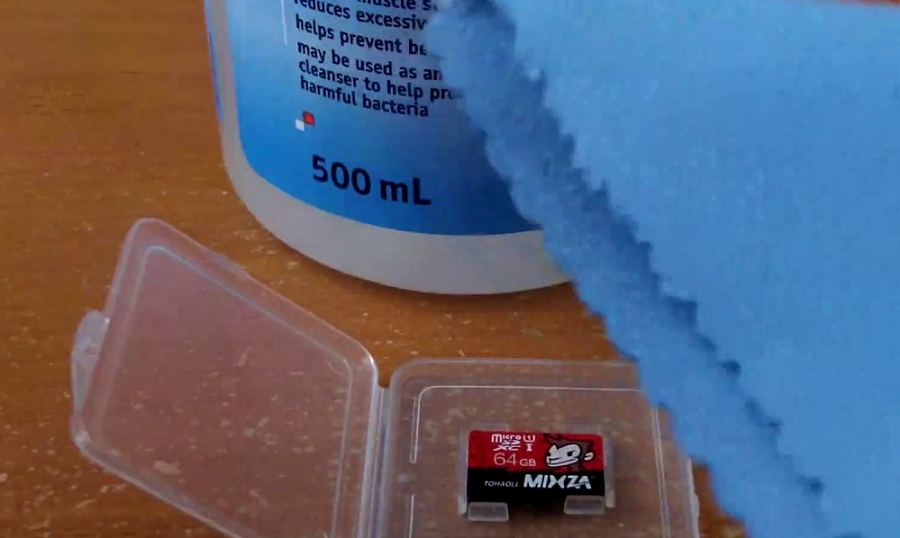
  • Remove the MicroSD card from your Android device and place it on a clean surface. Make sure that you turn off your phone before pulling out the SD card for safety.
  • Flip the MicroSD card and using a white eraser, gently scrub the gold contact pins of the SD card to get rid of any residual dirt or grime.
  • If you have an alcohol-based cleaning solution or even nail polish remover around, dab it on to the connector pins using a Q-tip and gently rub it.
Once the SD card has dried out, you can plug it back into your Android device and turn it on to see if the solution has worked.


Step 2 – Format the SD Card

If your SD card is being detected by the Android device but you're having trouble accessing the saved files, there's a good chance that the files are corrupt. This could either be due to a particular broken file in the saved storage, or a virus that is causing the issue.
Either way, the only option there is left for you to try out is make the SD card reusable for formatting it.
  • From the home screen of your Android device, head over to the Settings app and then scroll down to find the Storage
  • In the Storage tab, you'll be able to find the Erase SD Card option, so go ahead and select it.
  • Confirm your action to delete all of the files and folders stored on your SD card and this should effectively solve the issue.

Step 3 – Check the SD card compatibility

If you are trying to figure out how to repair a crashed SD card on an older Android device, you might just need to look at the details more carefully. If your SD card fails to be recognized on the mobile device but works with your computer, the problem could be related to compatibility.
  • If the MicroSD card that you are trying to use with your older phone is SDXC version (built for higher transfer speeds), it will not be recognized.
  • Look up the maximum capacity of expandable storage that is supported by your device, since they can vary from starting at 64GB to all the way up to 256GB.

Step 4 – Diagnose the SD card using a PC

If a simple format did not help you solve the SD card problem, you might need a more technical analysis of the issue. To do so, you can plug in your SD card into a computer and use the diagnostic tools to find out the pertaining errors and effectively fix them.
  • Connect your Android mobile device to a computer using a USB cable.
  • Make sure that you connect Android as MSC (Mass storage mode) and not MTP (Media transfer mode). You can do this using the notification menu once you connect the phone to your computer.
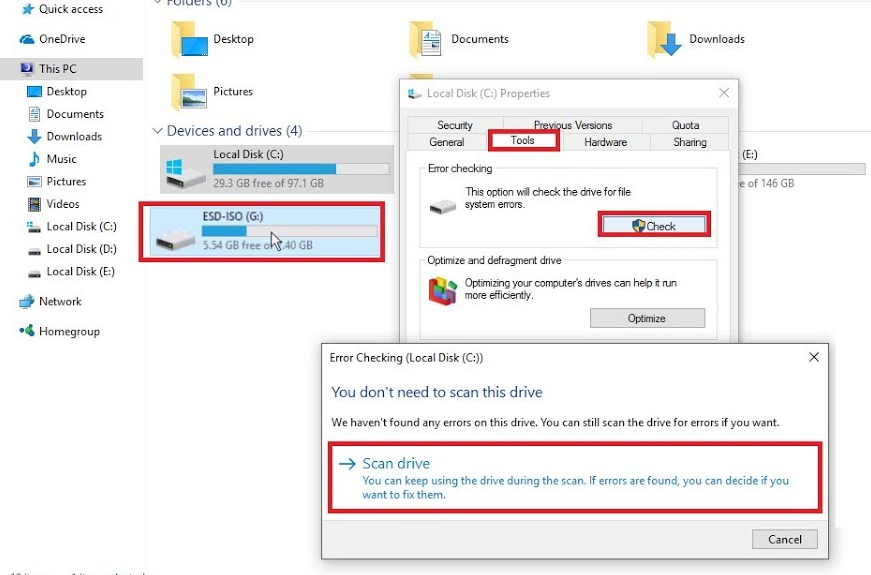
  • Launch the Windows Explorer and right click on the SD card driver you see on the screen. In the options menu, choose Properties – Tools – Error Checking and wait for the entire process to complete.
  • The computer will try to update the software for your SD card and fix any errors that are causing it to crash.

Step 5 – Use chkdsk to fix/repair a corrupted SD card without data loss

The "chkdsk" command is your first choice for damaged SD card repair. Requiring no format, it allows you to fix or repair a corrupted SD card and regain access to all your important files on the device. Let's see how it works. (I'm using Windows 7 for this demonstration)
1. Plug in your SD card to your computer with a card reader.
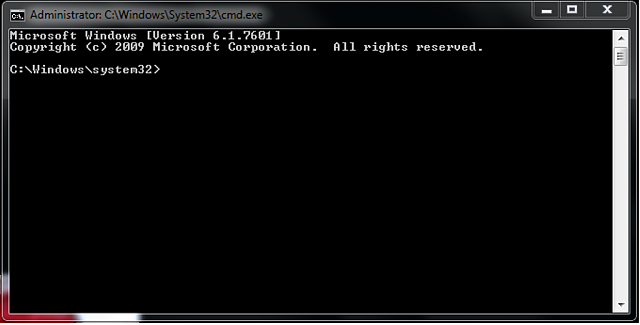
2. Go to the start menu, type in "cmd" in a search bar, hit enter and then you can see something named "cmd. exe" in a list of programs.
3. Right-click "cmd. exe" and then you will get the following command windows that allow you to fix your corrupted SD card without formatting.
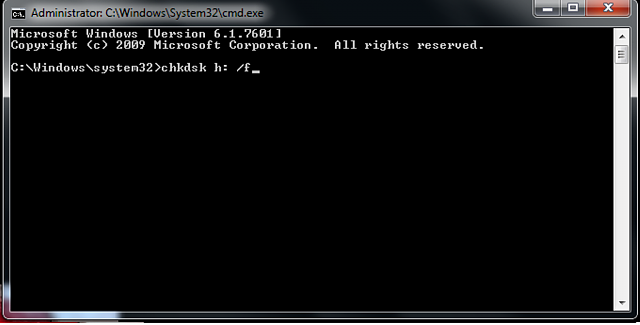
4. Type in "chkdsk /X /f sd card letter:" or "chkdsk sd card letter: /f ", for example,"chkdsk /X /f G:" or "chkdsk h: /f".
After finishing all the steps, Windows will have checked and fixed the file system of the SD card. It usually takes several minutes. After that, if you see "Windows has made corrections to the file system" in the command window, then congratulations! The damaged SD card is successfully fixed and you can see your data again. If not, you should try a third-party data recovery software to retrieve your files from the damaged SD card and repair it by formatting.
Once the process has been completed, you can go ahead and pop the SD card back into your Android device and see if the issue has been resolved.

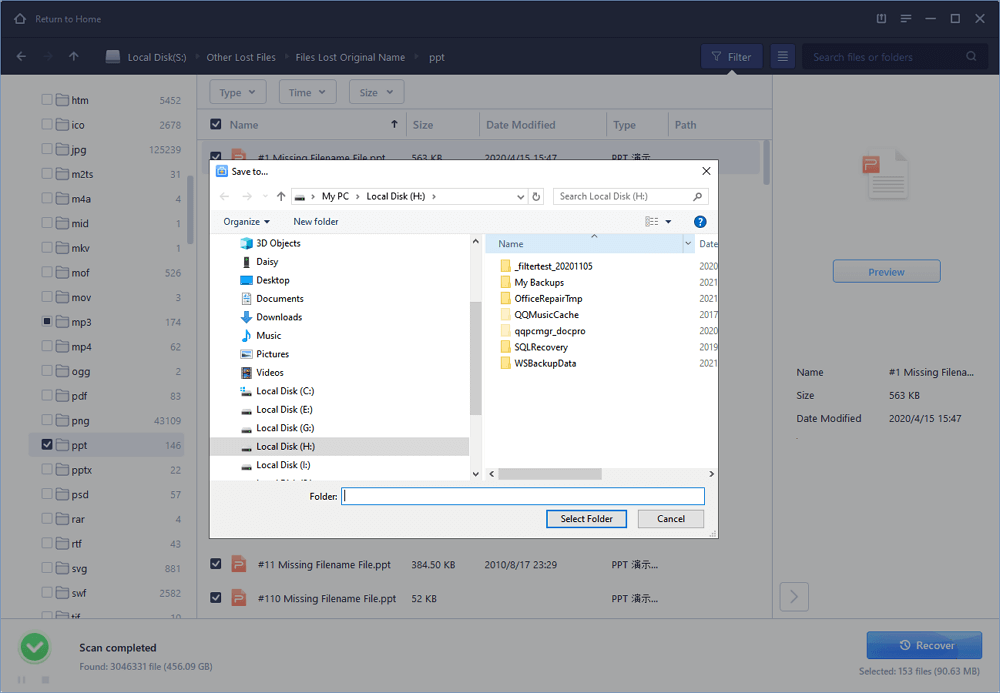
Step 6 : Use EaseUS Data Recovery Wizard to recover data from damaged SD card

1. Connect the corrupted SD card to your PC, launch EaseUS's data recovery software, select the card and click "Scan".
2. A quick scan will first start to search all the lost and existing data on the SD card. And after that, a deep scan will automatically launch in order to find more files.
3. After the scan, choose those files you want to recover and click the "Recover" button to retrieve them back.

Final Words :

So finally through this article, you have got to know about the method by which the SD card could be repaired and hence the data in it could be saved for the further access. We have tried to present the method in easy to grab manner and we believe that you could possibly get to know about it easily. Hope that you would have liked the information in this post, if it is so then please share it with others. Also, do not forget to share the post with others, let most of the people know about the method. Share your comments about the post through using the comment box below. At last never the fewer thanks for reading this post!

Related word


  1. Hacking The Art Of Exploitation
  2. Hacking Script
  3. Hacker Videos
  4. Hacking Games Online
  5. Hacking Quotes
  6. Pentesterlab
  7. Hacking To The Gate
  8. Pentest As A Service
  9. Pentest Nmap
  10. Pentest Usb
  11. Pentest Vpn
  12. Hacking Link
  13. Pentest Vs Red Team
  14. Hacking Tools
  15. Hacking Software
  16. Hacking With Python
  17. Pentest Tools